









Benchmark Experiment Host Manager (Bexhoma)
Orchestrating cloud-native DBMS benchmarking experiments on Kubernetes.
Bexhoma manages benchmark experiments of Database Management Systems (DBMS) in a Kubernetes-based cluster environment. It lets you configure hardware and software setups and repeat tests across varying configurations — all with a single command.

Benchmarks: YCSB · TPC-H · TPC-DS · TPC-C (HammerDB and Benchbase)
Tested DBMSs: Citus (Hyperscale), Clickhouse, CockroachDB, Dragonfly, Exasol, IBM DB2, MariaDB, MariaDB Columnstore, MemSQL (SingleStore), MonetDB, MySQL, OmniSci (HEAVY.AI), Oracle DB, PostgreSQL, SQL Server, SAP HANA, TiDB, TimescaleDB, Vertica, YugabyteDB
Tested cloud platforms: Amazon Web Services · Google Cloud · Microsoft Azure · IBM Cloud · Oracle Cloud · Minikube
Bexhoma acts as the orchestrator [2] for distributed parallel benchmarking experiments. The basic workflow is: start a containerised DBMS, deploy monitoring, import data, run benchmarks, and shut everything down — with a single command. A more advanced workflow plans a sequence of such experiments, runs them as a batch, and joins results for comparison.
Bexhoma also supports scaling out data-loading and benchmarking drivers to simulate cloud-native environments, as described in [4]. See example results from A Cloud-Native Adoption of Classical DBMS Performance Benchmarks and Tools.
Installation
Install the package:
pip install bexhoma
This requires Java and build tools.
Ensure
kubectlis installed and configured for a running Kubernetes cluster (e.g. Minikube) with dynamic PVC provisioning.Copy and adjust the cluster configuration:
cp k8s-cluster.config cluster.config
Set the context name, namespace, and cluster name. Ensure
resultfolderpoints to an existing directory on your local filesystem. See the full configuration guide.Optionally adjust the shared volume manifests before the first run:
k8s/pvc-bexhoma-results.yml— setstorageClassName(ReadWriteMany) andstoragesizek8s/pvc-bexhoma-data.yml— same
All other components (monitoring, message queue, evaluator) are deployed automatically on first use.
Optional: Install a conda environment:
conda create -n "bexhoma" python=3.14.2 ipython
Optional: Install Jupyter for notebooks:
conda install -c conda-forge jupyter
Quickstart
Each command below installs PostgreSQL, loads data, runs the benchmark, and prints a summary.
Monitor progress with bexhoma status while running.
YCSB
bexhoma ycsb run -ms 1 -tr -sf 1 -xwl a -dbms PostgreSQL \
  -xtb 16384 -nlp 1 -nlt 64 -xnlf 4 -nbp 1,8 -nbt 64 -xnbf 2,3
Loads 1 million rows, then runs workload A (50% reads / 50% updates, 1 million operations) targeting 32,768 ops/s (16,384 × 2) and 49,152 ops/s (16,384 × 3). Each target is tested with 64 driver threads as a single pod and again split across 8 pods.
See more details at https://bexhoma.readthedocs.io/en/latest/Example-YCSB.html
TPC-C (HammerDB)
bexhoma hammerdb run -ms 1 -tr -sf 16 -xsd 5 -dbms PostgreSQL \
  -nlt 16 -nbp 1,2 -nbt 16
Loads a TPC-C schema with 16 warehouses using 16 loader threads, then benchmarks for 5 minutes with 16 virtual users — first in a single pod, then split across 2 pods.
See more details at https://bexhoma.readthedocs.io/en/latest/Example-HammerDB.html
TPC-C (Benchbase)
bexhoma benchbase run -ms 1 -tr -sf 16 -xsd 5 -dbms PostgreSQL \
  -nbp 1,2 -nbt 16 -xnbf 16 -xtb 1024
Loads a TPC-C schema with 16 warehouses, then benchmarks for 5 minutes targeting 16,384 ops/s (1,024 × 16) with 16 threads — first in a single pod, then split across 2 pods.
See more details at https://bexhoma.readthedocs.io/en/latest/Example-Benchbase.html
TPC-H
bexhoma tpch run -ms 1 -dbms PostgreSQL
Loads 1 GB of TPC-H data (scale factor 1) and runs all 22 decision-support queries with a single client.
See more details at https://bexhoma.readthedocs.io/en/latest/Example-TPC-H.html
TPC-DS
bexhoma tpcds run -ms 1 -dbms PostgreSQL
Loads 1 GB of TPC-DS data (scale factor 1) and runs all 99 decision-support queries with a single client.
See more details at https://bexhoma.readthedocs.io/en/latest/Example-TPC-DS.html
Hardware (fio)
bexhoma hardware run -ms 1 -dbms Hardware -xht fio -xts 1G -xtd 30 -xfrw randread -xfbs 4k -xfid 16 -xfe libaio -nbp 1 -nbt 1 -ne 1
Runs a single 30-second fio random-read test at 4k block size and queue depth 16 directly against a dedicated SUT container over SSH, bypassing any DBMS.
See more details at https://bexhoma.readthedocs.io/en/latest/Example-Hardware.html#fio-disk-benchmarks
Hardware (sysbench)
bexhoma hardware run -ms 1 -dbms Hardware -xht sysbench -xtd 30 -nbp 1 -nbt 4 -ne 1
Runs a single 30-second sysbench CPU/memory test with 4 threads directly against a dedicated SUT container over SSH, bypassing any DBMS.
See more details at https://bexhoma.readthedocs.io/en/latest/Example-Hardware.html#sysbench-cpu-noisy-neighbor-benchmarks
Hardware (sockperf)
bexhoma hardware run -ms 1 -dbms Hardware -xht sockperf -xtd 300 -xspm ul -xspr max -xsps 8192 -xspp tcp -nbp 1 -nbt 1 -ne 1
Runs a single 5-minute sockperf under-load test over TCP at message size 8192 bytes (PostgreSQL’s page size, BLCKSZ) directly against a dedicated SUT container, bypassing any DBMS.
See more details at https://bexhoma.readthedocs.io/en/latest/Example-Hardware.html#sockperf-network-benchmarks
Architecture
Bexhoma deploys Prometheus for monitoring and cAdvisor for resource metrics alongside every DBMS container. For analytical benchmarks the dbmsbenchmarker package [3] is used as query executor and evaluator [1,2]. For transactional workloads, HammerDB, Benchbase, and YCSB act as drivers [4].
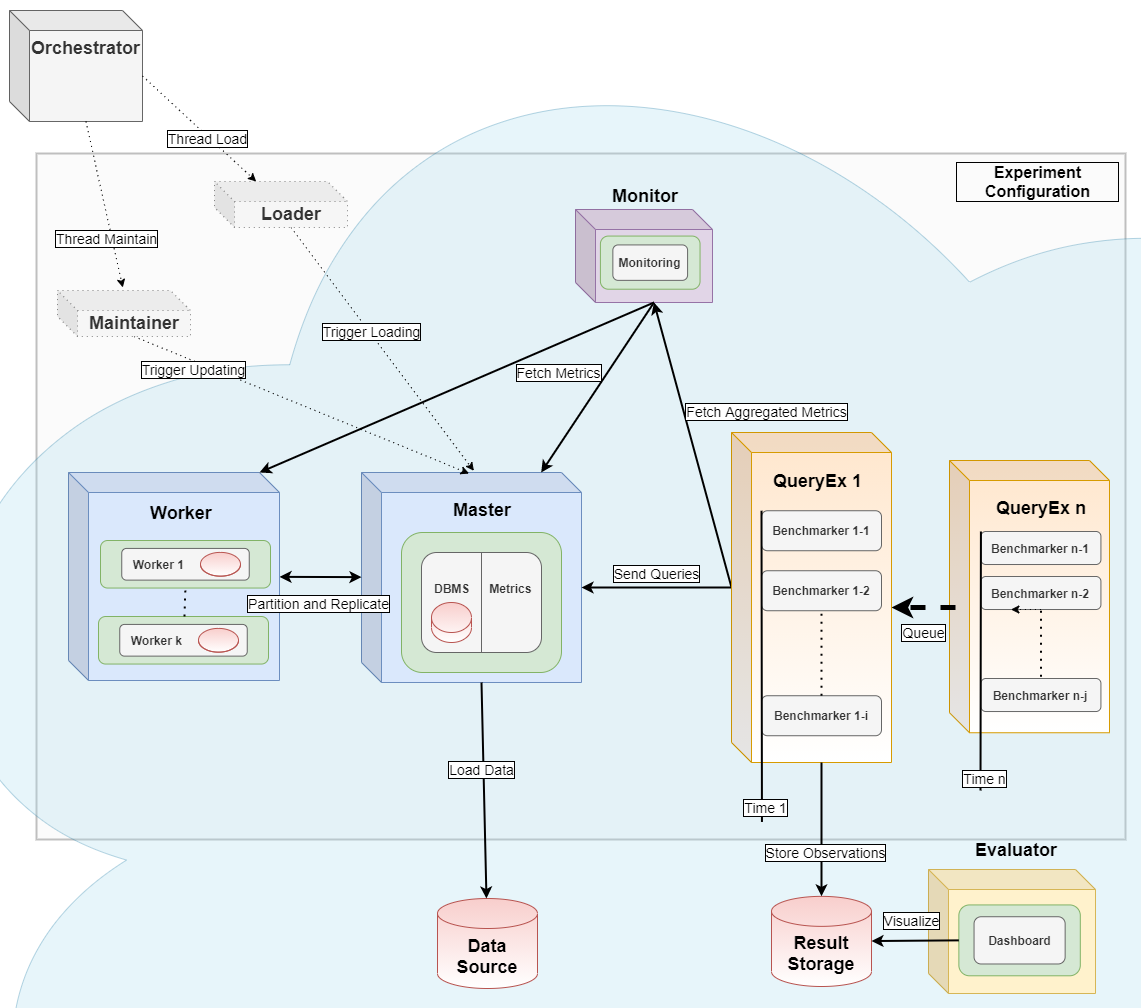
See the images/ folder for more details.
Contributing
We welcome contributions of all kinds — code, documentation, bug reports, and more. Please first read the contribution guide.
If you find a bug, please open an issue on the issue tracker and include:
Operating system and architecture
Python version
Bexhoma version (or git commit / date)
Full traceback
References
If you use Bexhoma in work contributing to a scientific publication, please cite [2] or [1]:
[1] Erdelt P.K. (2021). A Framework for Supporting Repetition and Evaluation in the Process of Cloud-Based DBMS Performance Benchmarking. TPCTC 2020, LNCS 12752, Springer.
https://doi.org/10.1007/978-3-030-84924-5_6
[2] Erdelt P.K. (2022). Orchestrating DBMS Benchmarking in the Cloud with Kubernetes. TPCTC 2021, LNCS 13169, Springer.
https://doi.org/10.1007/978-3-030-94437-7_6
[3] Erdelt P.K., Jestel J. (2022). DBMS-Benchmarker: Benchmark and Evaluate DBMS in Python. JOSS 7(79), 4628.
https://doi.org/10.21105/joss.04628
[4] Erdelt P.K. (2024). A Cloud-Native Adoption of Classical DBMS Performance Benchmarks and Tools. TPCTC 2023, LNCS 14247, Springer.
https://doi.org/10.1007/978-3-031-68031-1_9
[5] Erdelt P.K., Rabl T. (2026). Benchmarking Multi-Tenant Architectures in PostgreSQL. EDBT 2026.
https://doi.org/10.48786/edbt.2026.46
License
Bexhoma’s code is licensed under the GNU Affero General Public License v3.
The logo and other brand assets in docs/logo/ are licensed separately under CC BY 4.0.